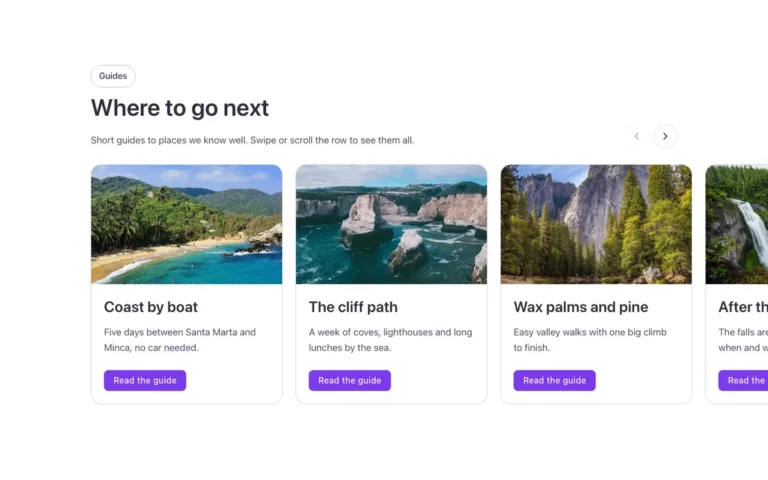
Cards · Photo
A photo card grid for Bricks Builder: three cards with the photo framed inside the card's own padding, a title, text and a button. On hover the photo turns and shrinks a little and switches from black and white to color, built with the FBK Card and FBK Card grid components so the look is editable from the panel.
In the annual plan, $99/year. See plans
Preview

Loading demo…
Template details
What’s inside
The components it’s built from. They come with the template when you paste it, and you edit them from the Bricks panel.
- FBK Button
A link styled as a button, with style, size and width.
- FBK Card
A media slot, title, text, a content slot and an actions slot.
- FBK Card grid
A grid that takes FBK Card or FBK Icon item instances, or a query loop.
- FBK Intro
Eyebrow, title, lead and an actions slot for buttons.
Adjust it
Change these variables in Bricks to tune it; everything else follows your framework.
On the element Cards, class fbk-cardsphoto
Photo: proportion and how much of the card's padding frames it (1 = all of it, 0 = to the card's edges)
- --fbk-t-ratio
- 3 / 2
- --fbk-t-inset
- 1
Photo on hover (class .fbk-cardsphoto--turn): its turn and size
- --fbk-t-turn
- -4deg
- --fbk-t-shrink
- 0.95
One hover duration for the whole library (--fbk-hover)
- --fbk-t-time
- var(--fbk-hover)
Replaces
In Fancy Bricks 1.0 and 2.0 this was Cards (2.0).