
Fancy Bricks plugin · Categories dropdown
A categories dropdown for Bricks Builder and WooCommerce
One button opens a multilevel menu of your product categories, blog categories, tags or any taxonomy. Subcategories open in place with a back button, and it all works from the keyboard.
- ↓↑
- Move through the list
- →
- Open a level
- ←
- Back to the level above
- Esc
- Close the menu
- ↓↑
- Move through the list
- →
- Open a level
- ←
- Back to the level above
- Esc
- Close the menu
One menu for any taxonomy
- Product categories, blog categories, tags or your own
- Multilevel, with a back button to the level above
- A count next to each term, on or off
- Arrow keys, Escape and ARIA for screen readers
- Menu left, right or auto, kept inside the screen
- Button, menu, items and back button styled in the panel
Settings you’ll find in Bricks
Screenshots of the real panel, set like the demo above. Pick a group.

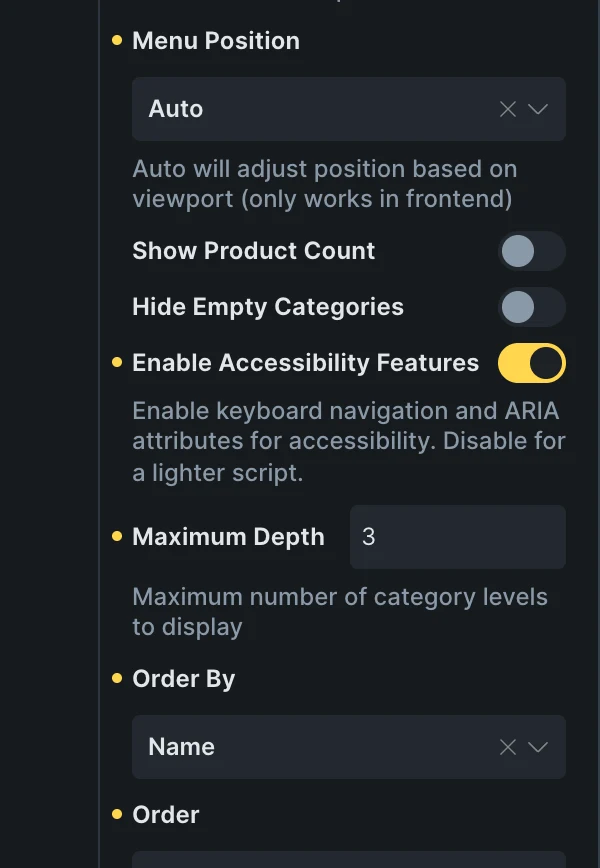
- Trigger and back buttonThe button’s text and icon, and the back button’s text.
- TaxonomyAny public taxonomy of the site, product categories by default.
- Depth and orderHow many levels, ordered by name, count or menu order.
- Counts and empty termsShow a count per term, and hide the empty ones.
Included in the annual and lifetime plans. See plans
Wherever visitors browse by topic
Shop headers
Every product category one click from any page.
Blog and archives
Categories or tags above the posts, or in a sidebar.
Docs and knowledge bases
Topics and subtopics of a custom taxonomy, level by level.
A header with room for the menu
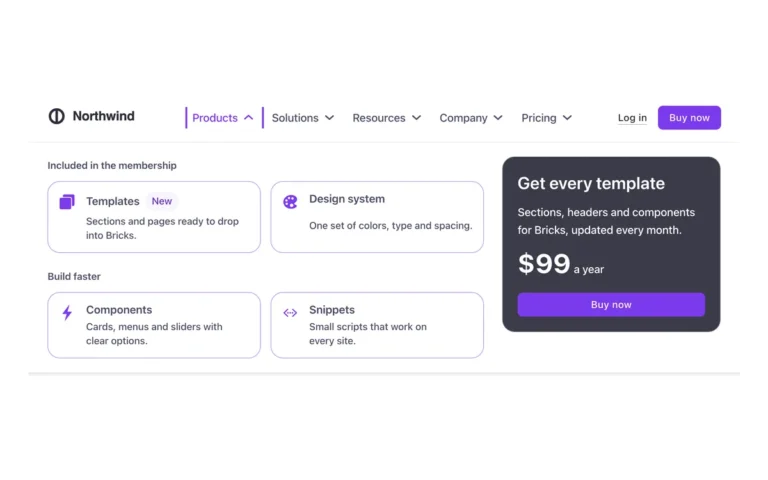
Drop the dropdown next to the navigation.
Questions, answered
Can’t find yours? Write to us.
Does it need WooCommerce?
No. Product categories are the default, but any public taxonomy works: blog categories, tags or one of your own.
How many levels does it show?
Up to the Maximum Depth you set, three by default. Each level opens in place, with a back button to the one above.
Is it included in the free plan?
No. The plugin is an extra included with the annual and lifetime plans.
Included in the annual and lifetime plans
Install the plugin from your account once you’re on a paid plan. Free templates and frameworks stay free either way.
See plansHow to install the plugin