Contact · Form in steps
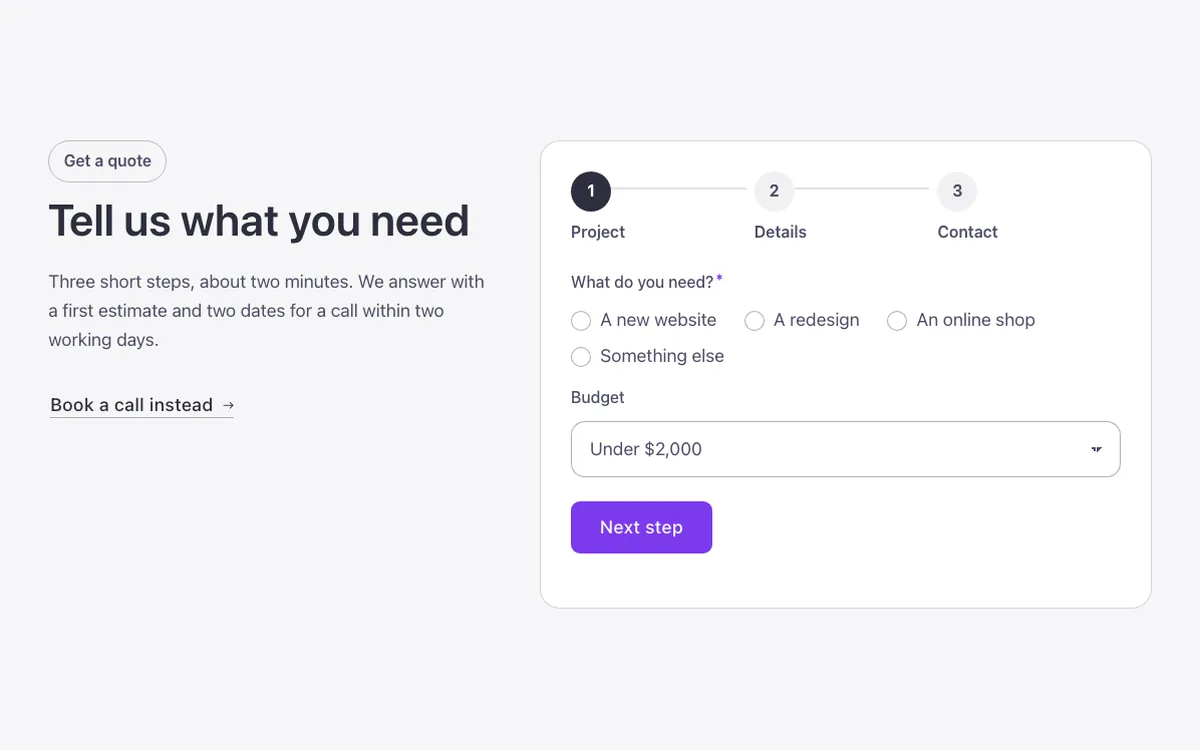
A functional multi-step contact form for Bricks Builder: a numbered progress indicator above a native Bricks form that shows one step at a time, with back and next buttons built as real FBK Action buttons. An HTML field in the form's own field list names each step, so new steps need no script changes.
In the annual plan, $99/year. See plans
Uses a small script. Turn on Code execution in Bricks › Settings › Custom code. How to turn on Code execution
Preview
Loading demo…
Template details
What’s inside
The components it’s built from. They come with the template when you paste it, and you edit them from the Bricks panel.
- FBK Action button
A real button for popups and interactions, not a link.
- FBK Button
A link styled as a button, with style, size and width.
- FBK Intro
Eyebrow, title, lead and an actions slot for buttons.
Adjust it
Change these variables in Bricks to tune it; everything else follows your framework.
On the element Quote card, class fbk-wf-steps
Card color (white like every Outline surface) and the line between steps
- --fbk-t-card-bg
- var(--fbk-card-scheme-bg, var(--white))
- --fbk-t-line
- color-mix(in srgb, currentColor 16%, transparent)