Gallery · Flip mosaic
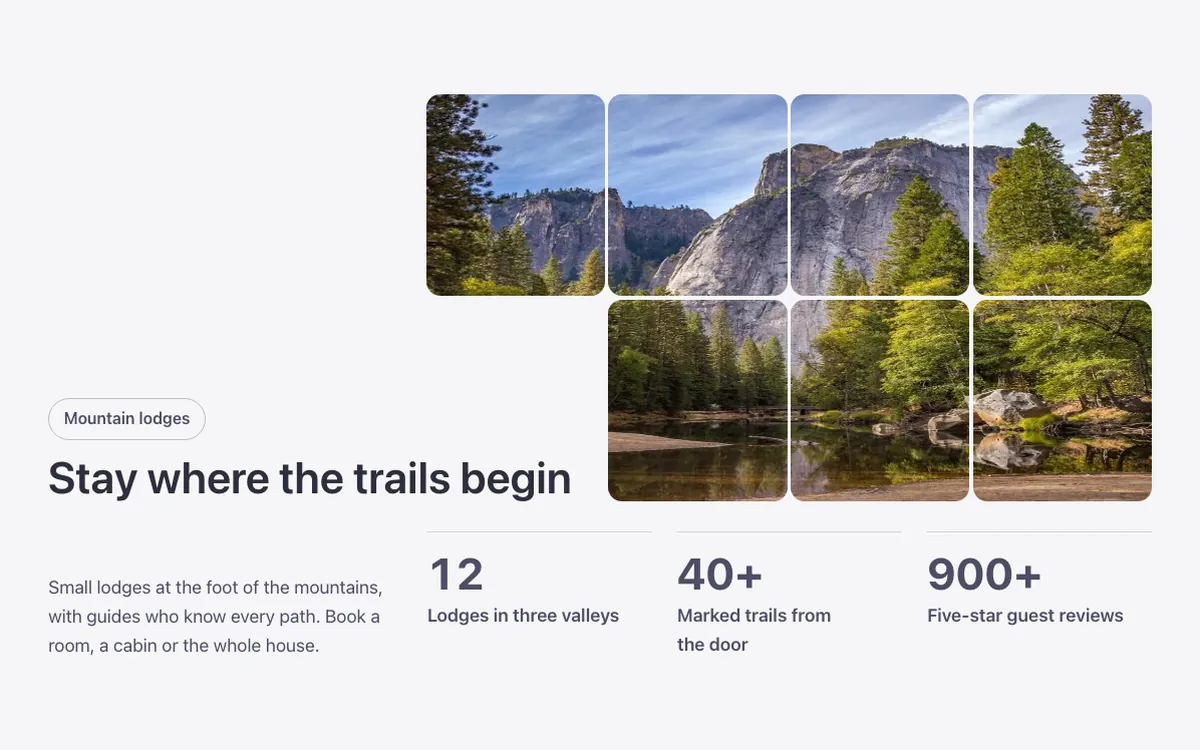
An image gallery for Bricks Builder with a photo cut into eight tiles that flip one by one to reveal a second photo underneath. The title sits in a corner notch, next to a lead and three figures that count up as the section comes into view. Good for a striking before-and-after style reveal.
In the annual plan, $99/year. See plans
Uses a small script. Turn on Code execution in Bricks › Settings › Custom code. How to turn on Code execution
Preview
Loading demo…
Template details
What’s inside
The components it’s built from. They come with the template when you paste it, and you edit them from the Bricks panel.
- FBK Counter
A figure that counts up when it comes into view, with a label and icon.
- FBK Counters
A list of FBK Counter figures laid out in a grid.
- FBK Flip mosaic
A photo cut into tiles that turn one by one into a second photo.
- FBK Intro
Eyebrow, title, lead and an actions slot for buttons.
Adjust it
Nothing extra to set: it takes its colors, spacing and type from your framework.
Replaces
In Fancy Bricks 1.0 and 2.0 this was Flip mosaic section (2.0).