Staggered slider
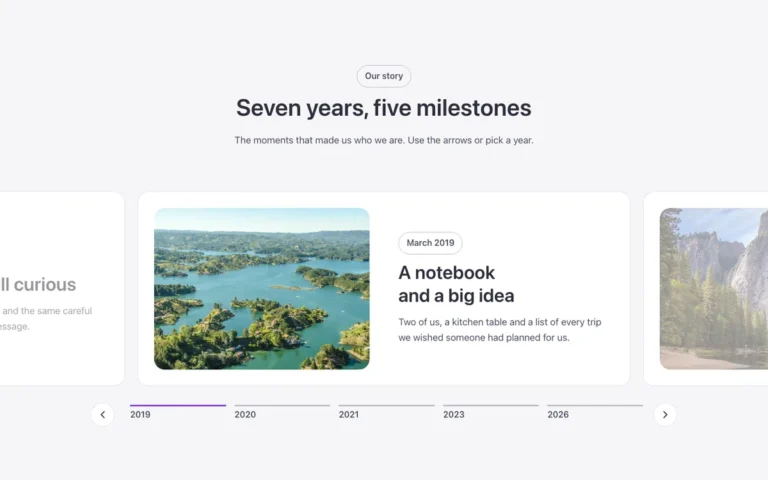
A staggered slider for Bricks Builder with a row of short thumbnails that ends in the active slide, shown full height with its title and text beside it. Choosing a thumbnail grows it into view while the slides after it stay hidden.
In the annual plan, $99/year. See plans
Uses a small script. Turn on Code execution in Bricks › Settings › Custom code. How to turn on Code execution
Preview

Loading demo…
Template details
What’s inside
The components it’s built from. They come with the template when you paste it, and you edit them from the Bricks panel.
- FBK Intro
Eyebrow, title, lead and an actions slot for buttons.
Adjust it
Change these variables in Bricks to tune it; everything else follows your framework.
On the element Slider, class fbk-stagger
Height of the active photo; the thumbnails show this much of theirs
- --fbk-t-height
- clamp(22em, 30vw, 28em)
- --fbk-t-thumb
- 45%
Width of the active slide's text (the slider's right padding in the Splide options leaves room for it)
- --fbk-t-text-w
- 20em
Bar under each thumbnail
- --fbk-t-accent
- var(--fbk-accent)
Layout (changes below 767 px)
- --fbk-t-slide-h
- var(--fbk-t-height)
- --fbk-t-photo-pos
- absolute
- --fbk-t-photo-ratio
- auto
- --fbk-t-text-pos
- absolute
- --fbk-t-text-pad
- var(--space-m)
- --fbk-t-arrows-room
- 0px
Replaces
In Fancy Bricks 1.0 and 2.0 this was Staggered slider (2.0).