Woo · Hero with products
A product hero for Bricks Builder laid out as a light panel split into a photo banner with a text card on top and a narrow column of a vertical product carousel beside it. The carousel uses the native Slider element with compact horizontal FBK Product card items, each with a text link whose underline draws in and arrow advances on hover.
In the annual plan, $99/year. See plans
Preview
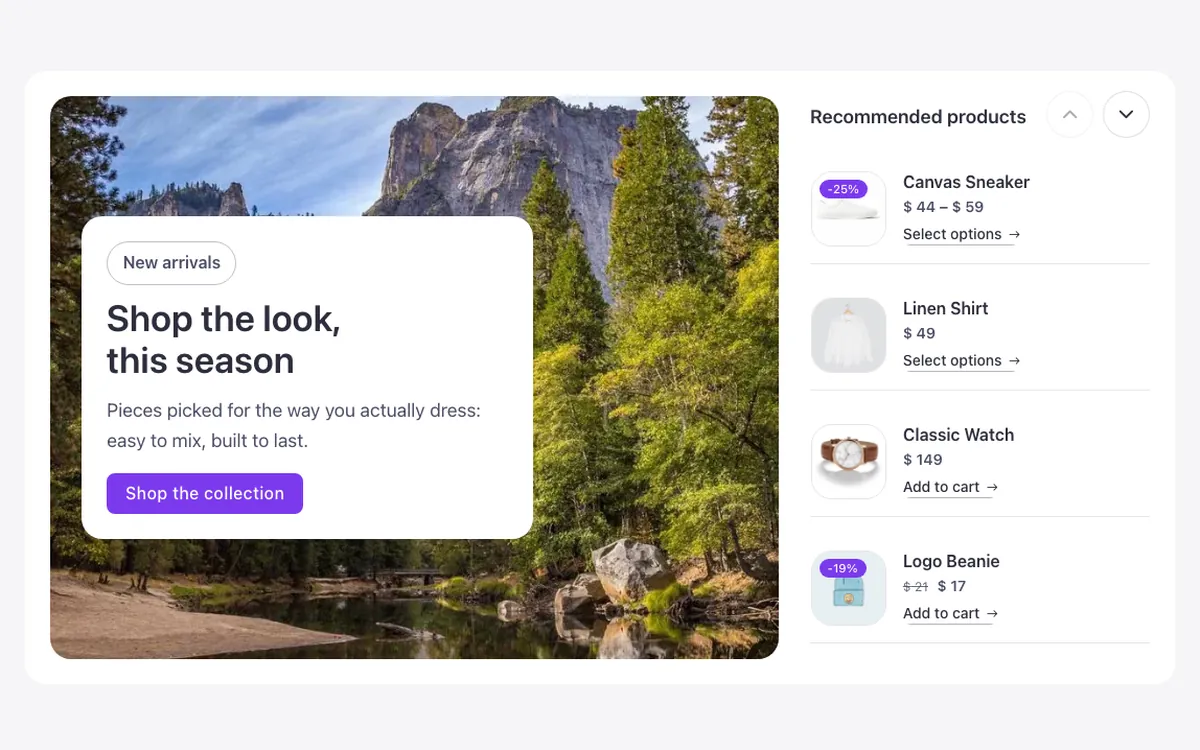
Loading demo…
Template details
What’s inside
The components it’s built from. They come with the template when you paste it, and you edit them from the Bricks panel.
- FBK Button
A link styled as a button, with style, size and width.
- FBK Intro
Eyebrow, title, lead and an actions slot for buttons.
- FBK Product card
A WooCommerce product inside a query loop, with its badges and cart button.
Adjust it
Change these variables in Bricks to tune it; everything else follows your framework.
On the element Hero · Panel, class fbk-heroprod
White in light, the dark surface when the site is dark (in CSS: a var() fallback breaks in a native control)
- --fbk-t-aside
- 1.4fr
- --fbk-t-list
- 26em
The carousel's up and down arrows: a step under the house size (a narrow column)
- --fbk-slider-size
- 2.25em
Replaces
In Fancy Bricks 1.0 and 2.0 this was Woocommerce Hero (1.0).