List hover words
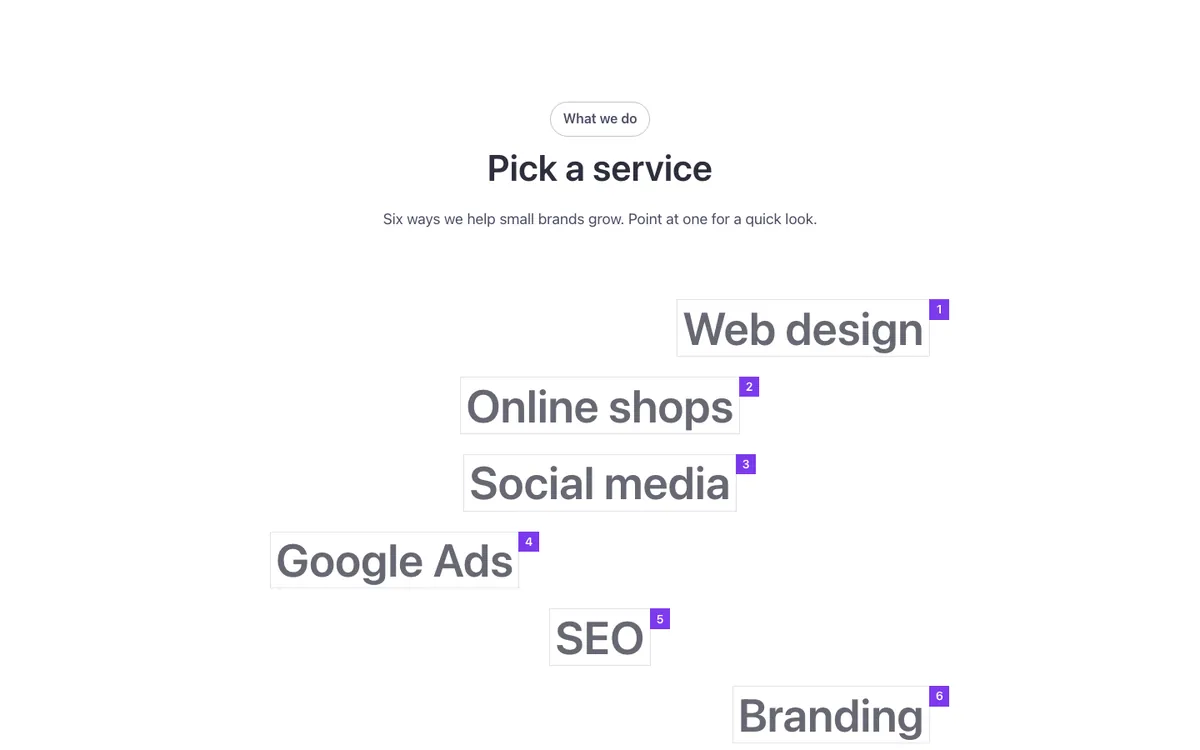
An interactive list for Bricks Builder with big words in thin, staggered frames, each numbered. On hover or keyboard focus, the word lights up and two photos slide out beside it, which also makes it usable without a mouse.
In the annual plan, $99/year. See plans
Preview
Loading demo…
Template details
What’s inside
The components it’s built from. They come with the template when you paste it, and you edit them from the Bricks panel.
- FBK Intro
Eyebrow, title, lead and an actions slot for buttons.
Adjust it
Change these variables in Bricks to tune it; everything else follows your framework.
On the element Hover words, class fbk-hoverwords
Accent (frame and number) and the words at rest
- --fbk-t-accent
- var(--fbk-highlight-accent, var(--fbk-accent))
- --fbk-t-rest
- color-mix(in srgb, currentColor 72%, transparent)
- --fbk-t-line
- color-mix(in srgb, currentColor 16%, transparent)
Photos beside the word
- --fbk-t-photo
- 7em
One hover duration for the whole library (--fbk-hover)
- --fbk-t-duration
- var(--fbk-hover)
Replaces
In Fancy Bricks 1.0 and 2.0 this was Fancy hover list (2.0).