
Fancy Bricks plugin
Native elements Bricks doesn’t have
Before/after, 360 viewers, countdown, wishlist, dropdowns and a timeline. Real Bricks elements, keyboard accessible, on your framework’s variables.
Included in the annual and lifetime plans. No template depends on it.
Native elements, one way of building
Drop one in a section, set it from the panel, and it takes your framework’s colors, spacing and type. No shortcodes.


Image comparison
A line between two photos. Drag, follow the mouse, arrow keys.


















Use the left and right arrow keys to rotate.
360 product spin
A photo sequence the visitor turns. Fewer frames on phones.

Use the arrow keys to look around.
360 panorama
Stand inside a 2:1 photo. Scenes, zoom, fullscreen.
- DaysHoursMinSec
Countdown
Nestable boxes you style. End date from dynamic data.
Wishlist and favorites
Toggle, live counter, query loop. Any post type.
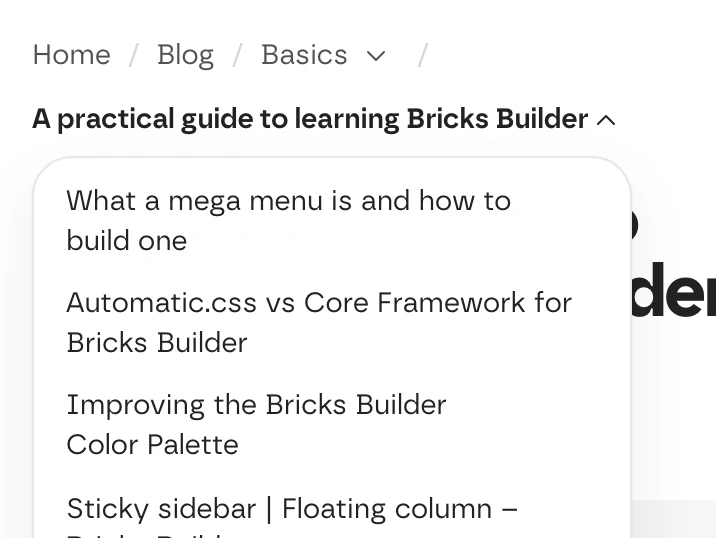
Breadcrumb with dropdowns
Each level opens its siblings; the last, related posts.
Categories dropdown
Multilevel menu for any taxonomy, counts optional.
Founded in Medellín
2019Studio in Bogotá
2022Workshop in Cali
2026
Nestable timeline
Items light up as the page scrolls. Can drive a map’s markers.


Also in the plugin: an icon button, and the AI panel that fills a page with your sections.
No template depends on it
Templates work with Bricks and your framework, on the free plan too. The plugin adds elements on top; if you leave, your pages keep working.
From your account to the builder
- Download the zip from My account and activate it
- Paste your license key and click Verify License
- Turn on the elements you want
Questions, answered
Can’t find yours? Write to us.
Do I need the plugin to use the templates?
No. Every template works without it. The plugin is an extra in the annual and lifetime plans.
Does it work with my framework?
Yes. Like the templates, every element reads your framework’s variables, so it matches your site.
Can I use it on client sites?
Yes. Paste the same key on every site; each one shows up in My account.
Included in the annual and lifetime plans
Install the plugin from your account once you’re on a paid plan. Free templates and frameworks stay free either way.
See plans