The settings screen
Everything the plugin does is set from one screen: Bricks › Fancy Bricks in your site's admin.
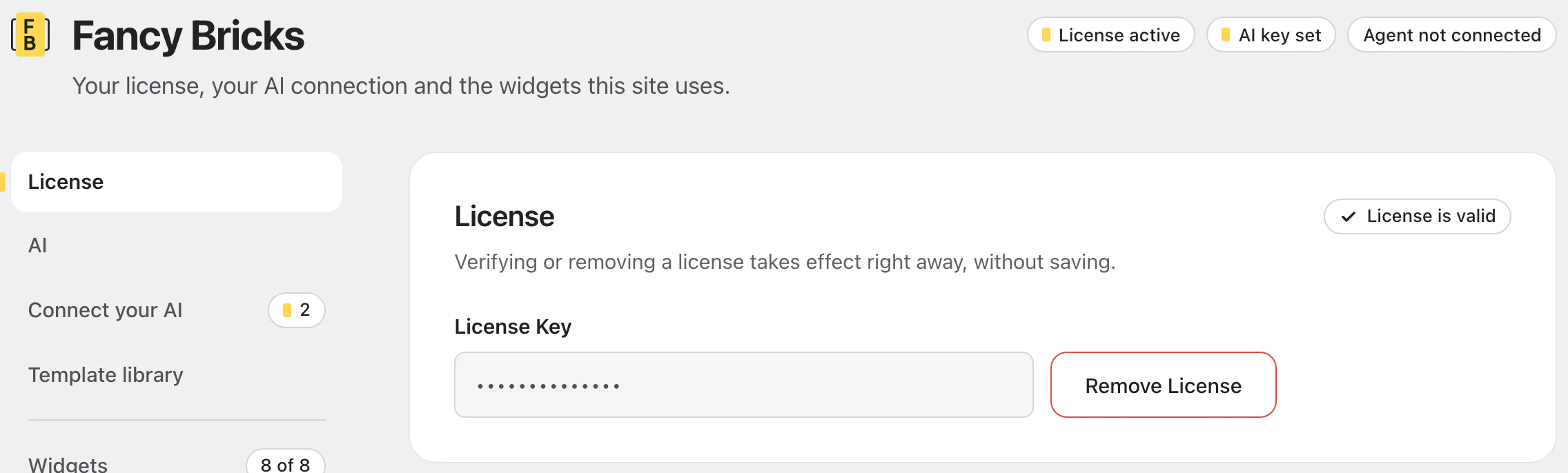 The top of the screen. The side menu takes you to each section and counts
what still needs you.
The header
Three labels sum up the site at a glance: whether the license is active, whether an AI key is set, and whether your agent is connected. The side menu next to the sections jumps to each one; a number next to a section means something there still needs you. On a phone, the menu becomes a row you scroll sideways.
License
Your license key turns on the elements and updates. Verify License and Remove License take effect right away, without saving. See Install and license.
The card shows one of four states:
| State | What it means |
|---|---|
| No key | Nothing entered yet. Paste your key and click Verify License. |
| License is valid | Updates are on. The key field is locked; Remove License frees it. |
| License expired | Your plan ended. The card links to renew; your pages keep working. |
| License invalid | The key was rejected. The message under the field says why. |
AI
The Anthropic API key for the AI content panel inside the Bricks editor. That panel is being retired: see The AI content panel (retiring). To use AI with Fancy Bricks, connect your own agent instead.
Connect your AI
Checks what your site needs for your own AI agent (Claude, Cursor or another MCP app) and gives you the configuration to paste in it. Each check says Ready, Needs you or Blocked. See Connect your agent.
Template library
Which version of the templates your agent fetches: your framework (Fancy Framework, Automatic.css, Core Framework or no framework) and your approach (desktop first or mobile first). The plugin detects the framework; change it only if what you've pasted doesn't match. If two frameworks are active at once, it asks you to pick one.
Widgets
One card per element, each with a switch. Turn on the ones you use: only those show up in the builder. The card's label counts how many are on. See the elements.
Saving
Changes to the AI key, the template library and the widgets are saved together. The bar at the bottom of the screen counts your unsaved changes; Save Settings saves them and Discard undoes them. If you leave the page with unsaved changes, your browser asks first.
Plugin data
Delete All Plugin Data removes everything the plugin stores on the site. It asks first and lists what goes and what stays:
- Deleted: your license key and its status, the Anthropic API key, the widget switches and the template library choice.
- Kept: the Fancy Bricks MCP application password, because it's a WordPress password, not a plugin setting. Revoke it from Users › Profile › Application Passwords.
Your pages and templates aren't touched.