Woo · Checkout
A WooCommerce checkout page built on Bricks Checkout (v2): order steps, billing, shipping and payment in clear blocks with labeled fields, a sticky order summary with coupon, and the order received page with the order details, addresses and downloads. Also styles the login, pay for order and receipt states.
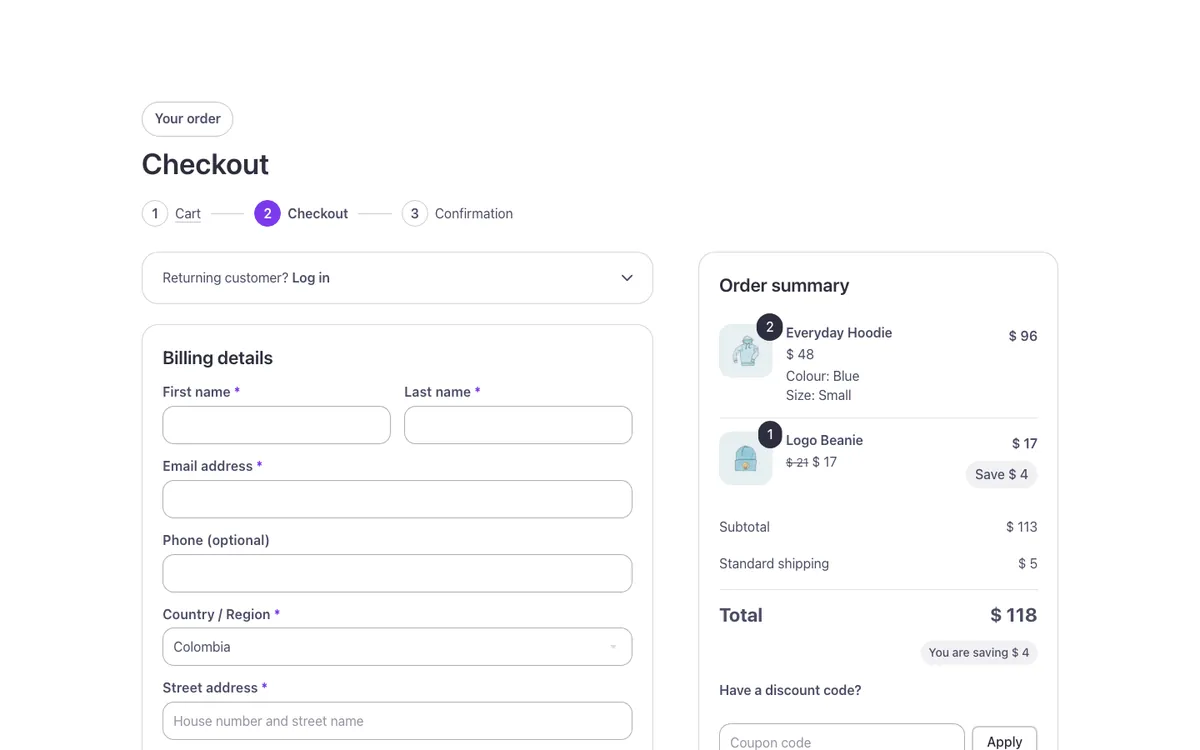
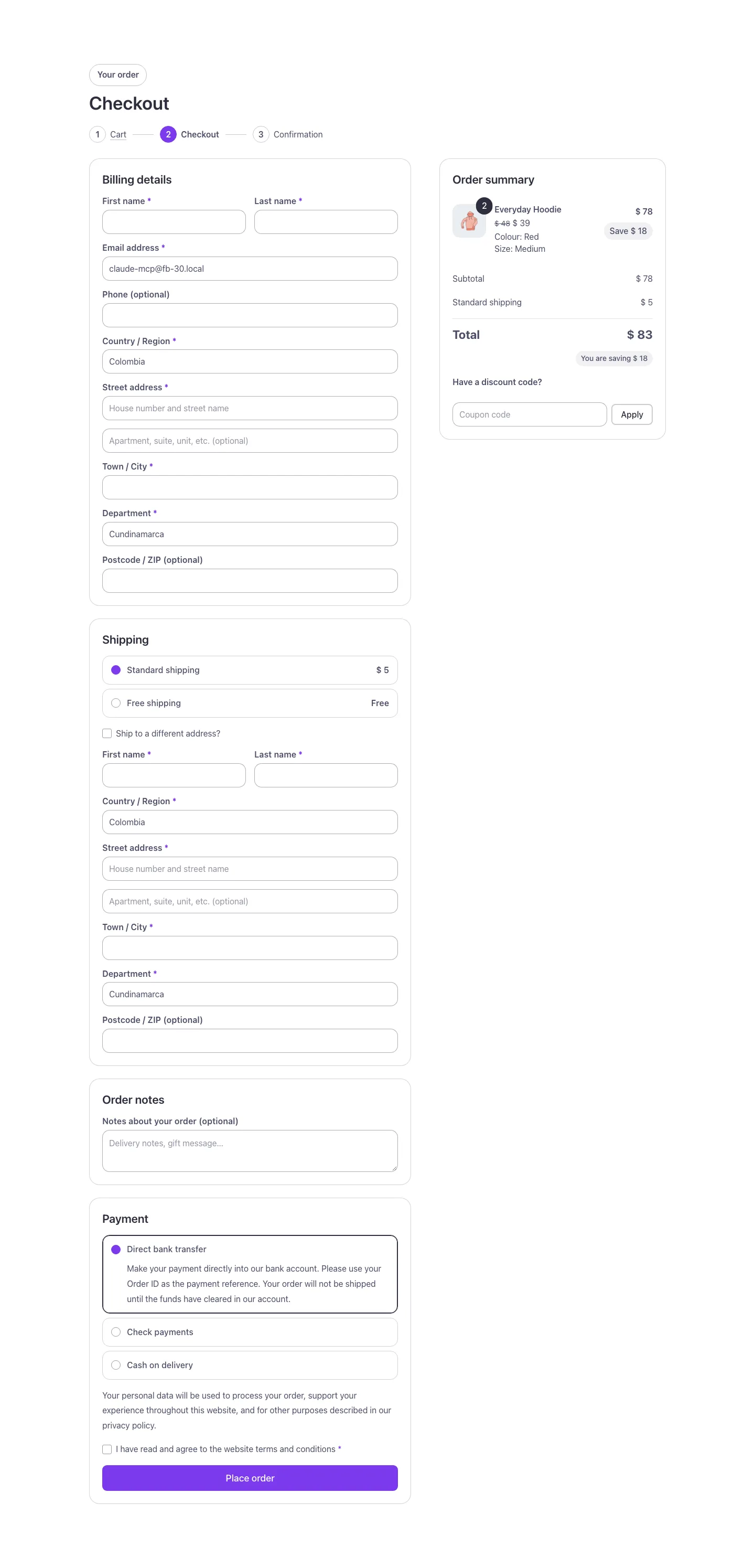
Full-page views: desktop, phone and dark mode
At 1440px wide.

At 390px wide.

With your site in dark mode.
See it live: Woo · Checkout on fancybricks.co — the live preview, and the button that copies it.
Structure
This is what the Bricks Structure panel shows after you paste the template. Component instances say which component they are.
Woo · Checkout
  Container
    Checkout · Wrap
      Checkout
        Checkout (state)
          Checkout · Head
            Checkout · Intro   (FBK Intro)
            Checkout · Order steps
              Checkout · Order steps · Cart
              Checkout · Order steps · Checkout
              Checkout · Order steps · Confirmation
          Checkout · Layout
            Checkout · Form
              Checkout · Notices
              Checkout · Login
                Checkout · Login toggle
                  Checkout · Login toggle text
                  Checkout · Login chevron
                Checkout · Returning customer
              Hook · woocommerce_checkout_before_customer_details
              Billing
                Billing · Title
                Hook · woocommerce_before_checkout_billing_form
                Billing · Fields
                  Field · billing_first_name
                  Field · billing_last_name
                  Field · billing_email
                  Field · billing_phone
                  Field · billing_country
                  Field · billing_address_1
                  Field · billing_address_2
                  Field · billing_city
                  Field · billing_state
                  Field · billing_postcode
                Hook · woocommerce_after_checkout_billing_form
                Billing · Account
                  Billing · Create account
              Shipping
                Shipping · Title
                Hook · woocommerce_checkout_shipping
                Shipping · Methods
                Shipping · Ship to another address
                Shipping · Fields
                  Hook · woocommerce_before_checkout_shipping_form
                  Field · shipping_first_name
                  Field · shipping_last_name
                  Field · shipping_country
                  Field · shipping_address_1
                  Field · shipping_address_2
                  Field · shipping_city
                  Field · shipping_state
                  Field · shipping_postcode
                  Hook · woocommerce_after_checkout_shipping_form
              Notes
                Notes · Title
                Hook · woocommerce_before_order_notes
                Field · order_comments
                Hook · woocommerce_after_order_notes
              Hook · woocommerce_checkout_after_customer_details
              Payment
                Payment · Title
                Hook · woocommerce_review_order_before_payment
                Payment · Methods
                Hook · woocommerce_review_order_after_payment
                Payment · Place order
                  Hook · woocommerce_checkout_before_terms_and_conditions
                  Hook · woocommerce_checkout_terms_and_conditions
                  Payment · Terms
                  Hook · woocommerce_checkout_after_terms_and_conditions
                  Hook · woocommerce_review_order_before_submit
                  Payment · Place order button
                  Hook · woocommerce_review_order_after_submit
            Checkout · Side
              Summary
                Summary · Panel
                  Hook · woocommerce_checkout_before_order_review_heading
                  Summary · Title
                  Hook · woocommerce_checkout_before_order_review
                  Summary · Lines
                    Summary line
                      Summary line · Media
                        Summary line · Photo
                        Summary line · Quantity badge
                      Summary line · Info
                        Summary line · Name
                        Summary line · Quantity (screen readers)
                        Summary line · Price
                        Summary line · Options
                      Summary line · Total
                        Summary line · Line total
                        Summary line · Save
                  Summary · Subtotal
                    Summary · Subtotal label
                    Summary · Subtotal amount
                  Summary · Coupons
                    Summary · Coupon row
                      Summary · Coupon name
                        Summary · Coupon code
                        Summary · Remove coupon
                          Summary · Remove coupon icon
                      Summary · Coupon amount
                  Summary · Fees
                    Summary · Fee row
                      Summary · Fee label
                      Summary · Fee amount
                  Summary · Taxes
                    Summary · Tax row
                      Summary · Tax label
                      Summary · Tax amount
                  Summary · Shipping
                    Summary · Shipping label
                    Summary · Shipping amount
                  Summary · Total
                    Summary · Total label
                    Summary · Total amount
                  Summary · Saving
                  Hook · woocommerce_checkout_after_order_review
                  Summary · Coupon
        Login required (state)
          Login required · Head
            Login required · Intro   (FBK Intro)
            Login required · Order steps
              Login required · Order steps · Cart
              Login required · Order steps · Checkout
              Login required · Order steps · Confirmation
          Login required · Box
            Login required · Notices
            Login required · Login form
              Hook · woocommerce_login_form_start
              Login required · Username or email address
              Login required · Password
              Hook · woocommerce_login_form
              Login required · Remember me
              Login required · Log in
              Login required · Lost password link
              Hook · woocommerce_login_form_end
        Pay (state)
          Pay · Head
            Pay · Intro   (FBK Intro)
            Pay · Order steps
              Pay · Order steps · Cart
              Pay · Order steps · Checkout
              Pay · Order steps · Confirmation
          Pay · Layout
            Pay · Form
              Pay · Notices
              Pay · Methods part
                Pay · Methods part · Title
                Pay · Methods
                Hook · woocommerce_pay_order_before_submit
                Pay · Place order
                  Hook · woocommerce_checkout_before_terms_and_conditions
                  Hook · woocommerce_checkout_terms_and_conditions
                  Pay · Terms
                  Hook · woocommerce_checkout_after_terms_and_conditions
                  Hook · woocommerce_review_order_before_submit
                  Pay · Place order button
                  Hook · woocommerce_review_order_after_submit
            Pay · Side
              Pay · Summary
                Pay · Summary title
                Pay · Lines
                  Pay line
                    Pay line · Media
                      Pay line · Photo
                      Pay line · Quantity badge
                    Pay line · Info
                      Pay line · Name
                      Pay line · Quantity (screen readers)
                      Pay line · Price
                      Pay line · Options
                    Pay line · Total
                      Pay line · Line total
                Pay · Totals
                  Pay · Totals · Row
                    Pay · Totals · Label
                    Pay · Totals · Value
                Hook · woocommerce_pay_order_before_payment
        Thank you (state)
          Thank you · Head
            Thank you · Intro   (FBK Intro)
            Thank you · Order steps
              Thank you · Order steps · Cart
              Thank you · Order steps · Checkout
              Thank you · Order steps · Confirmation
          Thank you · Content
            Thank you · Notices
            Hook · woocommerce_before_thankyou
            Failed
              Failed · Text
              Failed · Pay   (FBK Button)
            Thank you · Text
            Thank you · Facts
              Thank you · Facts · Order number item
                Thank you · Facts · Order number label
                Thank you · Facts · Order number
              Thank you · Facts · Date item
                Thank you · Facts · Date label
                Thank you · Facts · Date
              Thank you · Facts · Total item
                Thank you · Facts · Total label
                Thank you · Facts · Total
              Thank you · Facts · Payment method item
                Thank you · Facts · Payment method label
                Thank you · Facts · Payment method
            Hook · woocommerce_thankyou_payment_method
            Thank you · Layout
              Thank you · Details
                Thank you · Details title
                Hook · woocommerce_order_details_before_order_table
                Thank you · Lines
                  Thank you line
                    Thank you line · Media
                      Thank you line · Photo
                      Thank you line · Quantity badge
                    Thank you line · Info
                      Thank you line · Name
                      Thank you line · Quantity (screen readers)
                      Thank you line · Price
                      Thank you line · Options
                    Thank you line · Total
                      Thank you line · Line total
                Thank you · Totals
                  Thank you · Totals · Row
                    Thank you · Totals · Label
                    Thank you · Totals · Value
                Hook · woocommerce_order_details_after_order_table
              Thank you · Side
                Thank you · Customer
                  Thank you · Customer · Billing
                    Thank you · Customer · Billing title
                    Thank you · Customer · Billing address
                    Hook · woocommerce_order_details_after_customer_billing_address
                  Thank you · Customer · Shipping
                    Thank you · Customer · Shipping title
                    Thank you · Customer · Shipping address
                    Hook · woocommerce_order_details_after_customer_shipping_address
                  Hook · woocommerce_order_details_after_customer_details
                Thank you · Downloads
                  Thank you · Downloads · Title
                  Thank you · Downloads · List
                    Thank you · Downloads · Row
                      Thank you · Downloads · Info
                        Thank you · Downloads · Product
                        Thank you · Downloads · Limits
                      Thank you · Downloads · Download
                Thank you · Actions
                  Thank you · Shop   (FBK Button)
                Hook · woocommerce_after_order_details
            Hook · woocommerce_thankyou
        Receipt (state)
          Receipt · Head
            Receipt · Intro   (FBK Intro)
            Receipt · Order steps
              Receipt · Order steps · Cart
              Receipt · Order steps · Checkout
              Receipt · Order steps · Confirmation
          Receipt · Content
            Receipt · Notices
            Receipt · Facts
              Receipt · Facts · Order number item
                Receipt · Facts · Order number label
                Receipt · Facts · Order number
              Receipt · Facts · Date item
                Receipt · Facts · Date label
                Receipt · Facts · Date
              Receipt · Facts · Total item
                Receipt · Facts · Total label
                Receipt · Facts · Total
              Receipt · Facts · Payment method item
                Receipt · Facts · Payment method label
                Receipt · Facts · Payment method
            Hook · woocommerce_receipt_payment_method
      Empty cart
        Empty · Head
          Empty · Intro   (FBK Intro)
          Empty · Order steps
            Empty · Order steps · Cart
            Empty · Order steps · Checkout
            Empty · Order steps · Confirmation
        Empty · Notices
        Empty
          Empty · Icon box
            Empty · Icon
          Empty · Title
          Empty · Text
          Empty · Shop   (FBK Button)
The template also pastes a dashed note above the section, with the short version of this page. It only shows inside the builder, never on the published page — see Builder notes.
How to adjust
Every step is the same move: pick the element in the Structure panel, change its Properties.
How to adjust a template shows every one of them in a screenshot of the real builder: the Structure and Properties panels, the classes on an element, a component's style families and the field where a CSS variable goes.
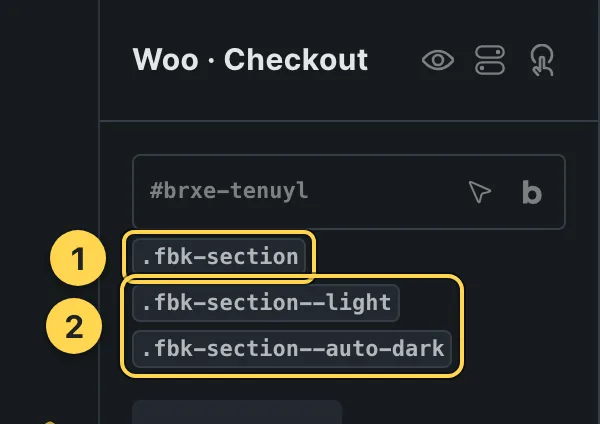
The classes this element carries, in the Bricks panel.
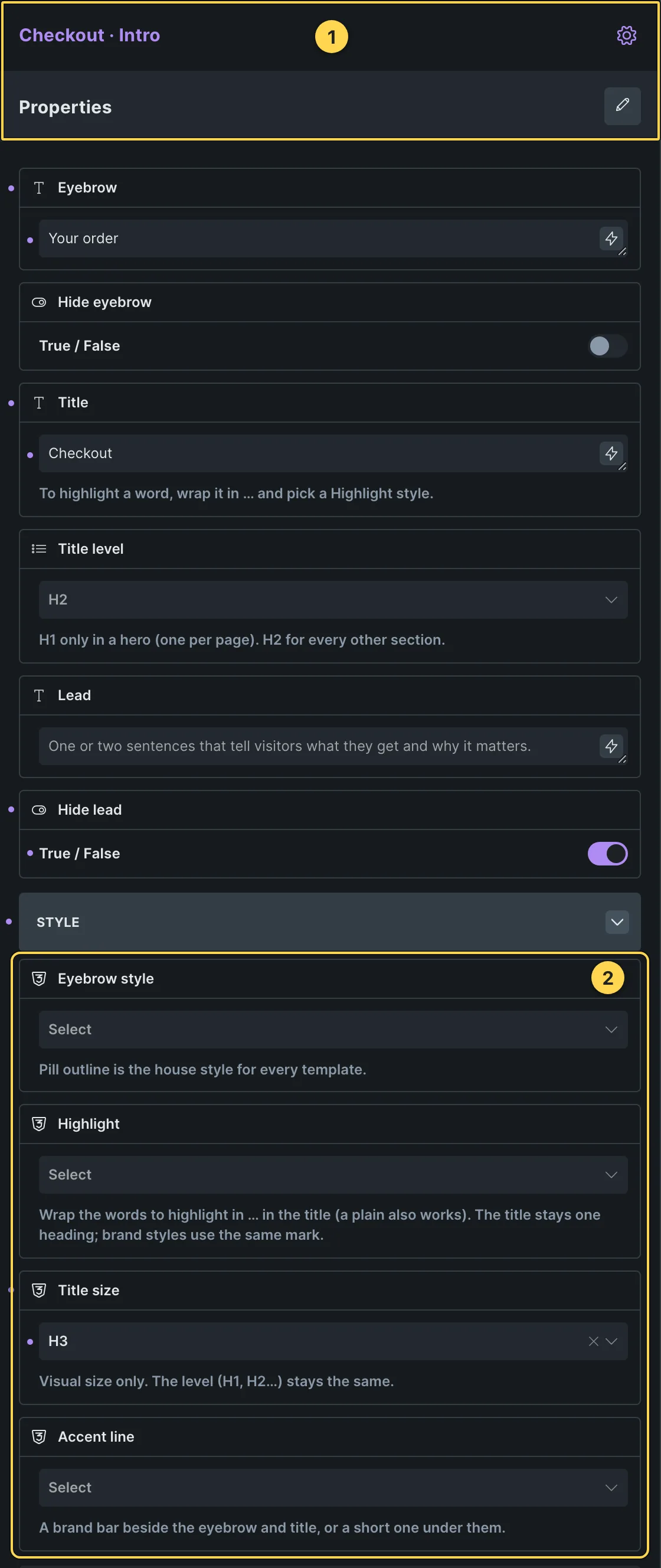
This template's own component, with its Style group open.
- Paste the template in Bricks first — see Copy and paste.
- Select Checkout · Intro, Login required · Intro, Pay · Intro (+3 more) (FBK Intro) › Properties: Eyebrow, Hide eyebrow, Title, Title level, Lead, Hide lead · Style group: Eyebrow style, Highlight, Title size, Accent line · Layout group: Alignment, Layout, Background, Spacing · Motion group: Reveal in slider.
- Select Failed · Pay, Thank you · Shop, Empty · Shop (FBK Button) › Properties: Text, Link, Tone, Shadow on hover · Icon group: Icon, Icon position · Style group: Style, Size, Width, Hover effect.
- Spacing, sizes, color and timing with no property of their own: the CSS variables below.
CSS variables
These are the only values in the template meant to be changed by hand. Copy the block, paste it, edit the numbers.
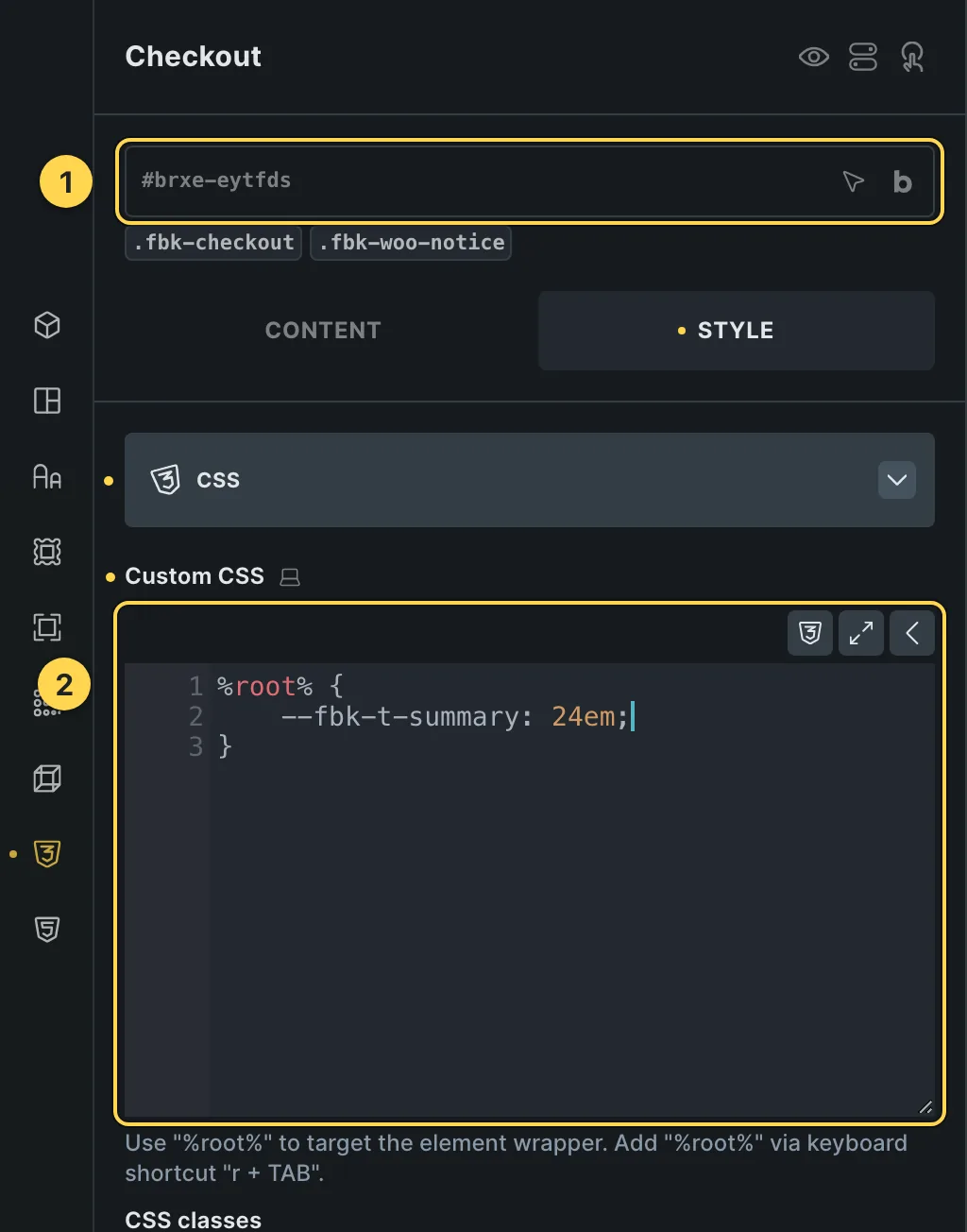
The Custom CSS field of this template's own element, with one of its variables as a real example.
/* «Checkout» · class .fbk-checkout */
.fbk-checkout {
  /* Width of the order summary column */
  --fbk-t-summary: 24em;
}
Paste the block in the element's Style → CSS field (the selector is already in it), or set the same variables on the class itself to change every copy at once. The values are your framework's variables, so they follow your site: Choosing a framework.
Requirements
- WooCommerce. Needs WooCommerce active, with the products/fields this template queries already set up.
What each requirement is, and how to set it up once for the whole site: Requirements.
Finish by hand
- Needs Bricks > Settings > WooCommerce > Enable advanced modular elements (experimental in Bricks 2.4).
- Paste or insert this template into the page set as Checkout in WooCommerce > Settings > Advanced, edited with Bricks. Bricks only reads Checkout v2 from that page: it does not work as a Template element or as a Checkout template.
- Switch the state you edit with State on the Checkout element (Checkout, Login, Pay, Thank you, Receipt).
- Empty cart is the panel for a visitor whose cart is empty: WooCommerce prints nothing on the checkout page without items, and Bricks' Checkout has no empty state. It sits beside the Checkout element with the conditions Cart items count = 0 and Order id empty (so it stays out of the thank you, pay and receipt pages). WooCommerce normally sends an empty cart from the checkout to the cart page, so the panel shows in the template preview and wherever that redirect is off or the cart and the checkout share one page. In the builder it always shows: edit its text and button there.
- The coupon field in the summary is Bricks' Checkout coupon element: turn on Bricks > Settings > WooCommerce > Use Bricks checkout coupon element (without it Bricks leaves it out).
- Returning customer? Log in is Bricks' Checkout login element: turn on Bricks > Settings > WooCommerce > Use Bricks checkout login element and WooCommerce > Settings > Accounts & Privacy > Allow customers to log into an existing account during checkout. It shows only to visitors who are not logged in.
- Under the total, You are saving … adds the sale discounts of the cart and its coupons (function fbk_woo_cart_savings of the Fancy Bricks plugin or its support file); it hides when nothing is saved.
- The Department label of the state field is the one WooCommerce uses for Colombia; WooCommerce replaces it with the right word for the country the customer picks.
- Payment gateways add their own fields inside Payment · Methods; keep the Hook · texts: gateways and plugins print through them.
On phones
The template is designed desktop first, the Bricks default, and only changes at the two widths the library uses:
- 991px and below —
.fbk-checkout__layout,.fbk-checkout__side,.fbk-intro. - 767px and below —
.fbk-section,.fbk-wline,.fbk-wline__total(+2 more).
Those changes live in Bricks' own breakpoint fields, so you edit them where you always do: pick the breakpoint in the toolbar and the same fields follow.
Careful with the classes shared by the whole library (fbk-section, fbk-intro, the
component classes): a change there shows up in every template that uses them.
If your site's breakpoints are set up mobile first, copy the mobile-first variant of the template instead — see Copy and paste.
Accessibility
In this template, keyboard focus is visible on every interactive piece; movement is cut back
when the visitor's system asks for less motion; the state screen readers need is already set
(aria-current, aria-hidden, aria-label).
What is checked on every template, and what depends on your own palette: Accessibility.
Dark mode
With your site in dark mode this section turns dark too — the class fbk-section--auto-dark
on the section does it. Remove the class to keep it light.
Its background is a modifier on the section, so you can swap it for any of the ones the
template is checked with: fbk-section--light, fbk-section--soft, fbk-section--dark.
How the library follows your site's color scheme: Dark mode and preview.
Replaces
- 01 - Woocommerce Checkout from Fancy Bricks 1.0
- 01 - Woo checkout from Fancy Bricks 2.0
- 02 - Woo Checkout from Fancy Bricks 2.0
What happened to the old libraries, and what to do with pages already built with them: Migrating from 1.0/2.0.