FAQ · Box
A centered intro, the questions in a framed box with the arrow in an Outline icon box, and a button to ask anything else. The open question gets a soft tint and an accent bar beside it.

Full-page views: desktop, phone and dark mode

At 1440px wide.

At 390px wide.
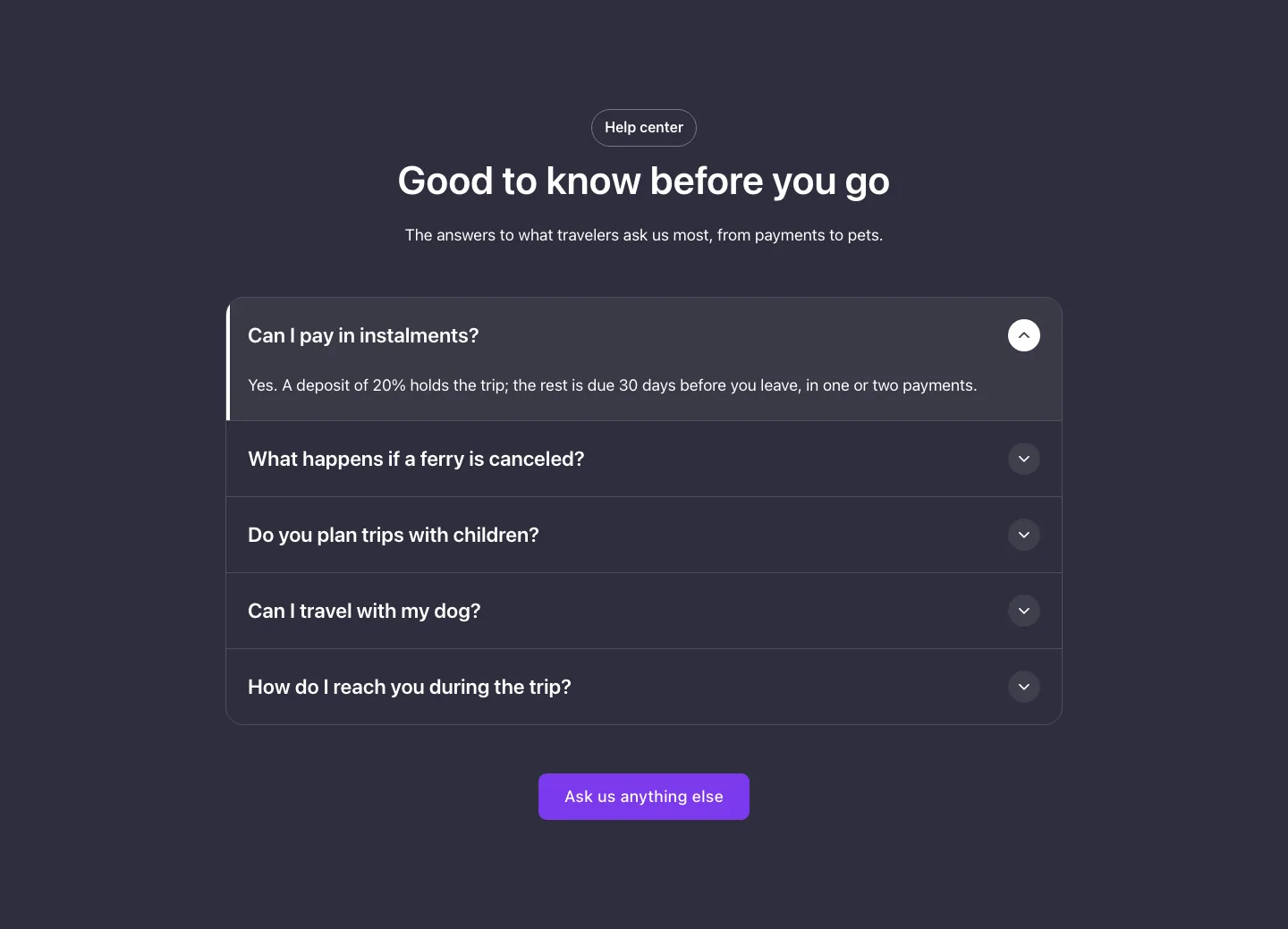
With your site in dark mode.
See it live: FAQ · Box on fancybricks.co — the live preview, and the button that copies it.
Structure
This is what the Bricks Structure panel shows after you paste the template. Component instances say which component they are.
FAQ box
  Container
    FAQ column
      Intro   (FBK Intro)
      FAQ   (FBK Accordion)
        Item · Can I pay in instalments?   (FBK Accordion item)
        Item · What happens if a ferry is canceled?   (FBK Accordion item)
        Item · Do you plan trips with children?   (FBK Accordion item)
        Item · Can I travel with my dog?   (FBK Accordion item)
        Item · How do I reach you during the trip?   (FBK Accordion item)
      Button   (FBK Button)
The template also pastes a dashed note above the section, with the short version of this page. It only shows inside the builder, never on the published page — see Builder notes.
How to adjust
Every step is the same move: pick the element in the Structure panel, change its Properties.
How to adjust a template shows every one of them in a screenshot of the real builder: the Structure and Properties panels, the classes on an element, a component's style families and the field where a CSS variable goes.

The classes this element carries, in the Bricks panel.
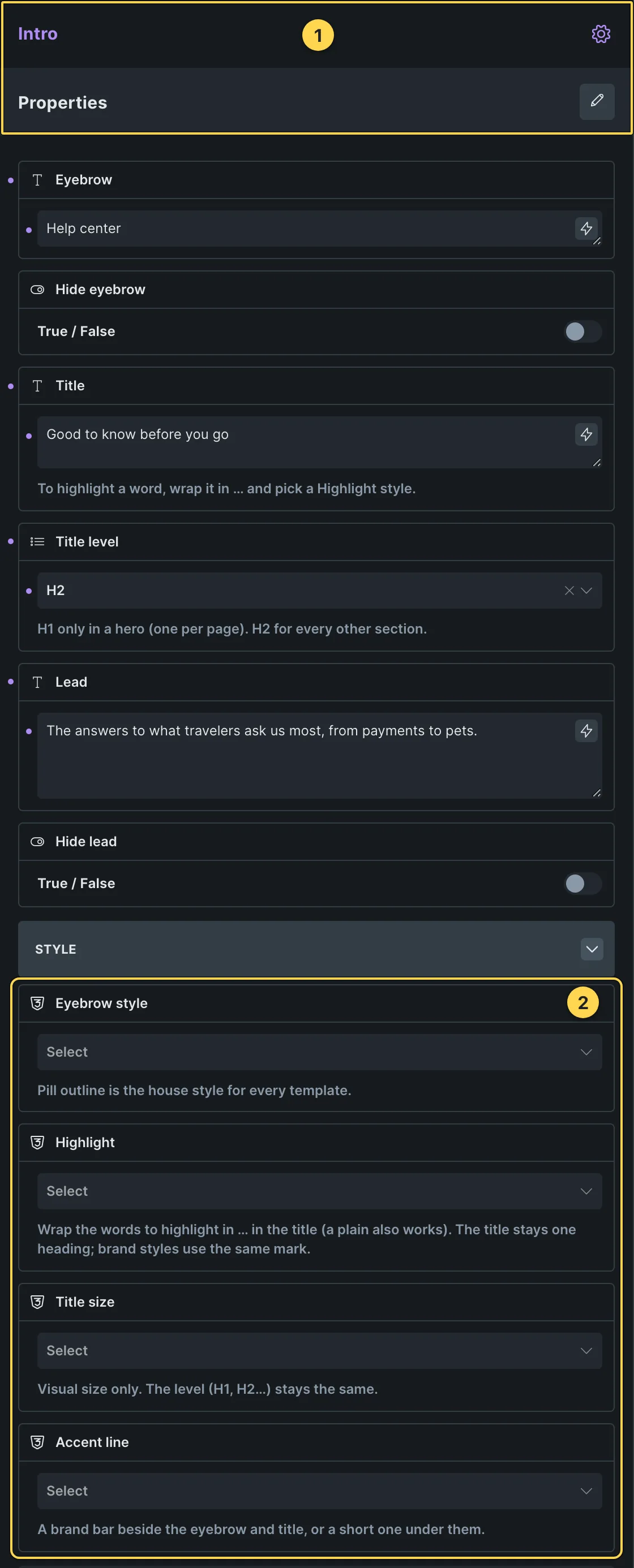
This template's own component, with its Style group open.
- Paste the template in Bricks first — see Copy and paste.
- Select Intro (FBK Intro) › Properties: Eyebrow, Hide eyebrow, Title, Title level, Lead, Hide lead · Style group: Eyebrow style, Highlight, Title size, Accent line · Layout group: Alignment, Layout, Background, Spacing · Motion group: Reveal in slider.
- Select FAQ (FBK Accordion) › Properties: Open the first item, Several open at once, FAQ schema · Style group: Style, Open item accent, Open title color, Hover effect, Title color on hover, Background · Icon group: Icon, Look, Tone, Shape, Size, Hover effect, Icon position · Layout group: Numbers, Columns · Autoplay group: Time per item, Autoplay on phones.
- Select Item · Can I pay in instalments?, Item · What happens if a ferry is canceled?, Item · Do you plan trips with children? (+2 more) (FBK Accordion item) › Properties: Title, Text, Hide text, Tag, Tag text · More group: Title level, Icon.
- Select Button (FBK Button) › Properties: Text, Link, Tone, Shadow on hover · Icon group: Icon, Icon position · Style group: Style, Size, Width, Hover effect.
Finish by hand
- Each question is an FBK Accordion item in the Items slot of the accordion: change its title and text, duplicate one to add a question, or put a block with a query loop in the slot.
- FAQ schema is on: keep it on one accordion per page, with real questions and answers.
- Column width: Max width of
.fbk-faqbox. The bar beside the open question is ::before of.fbk-accordion__item; the open state (tint, filled circle) is %root%.brx-open in the same class.
On phones
The template is designed desktop first, the Bricks default, and only changes at the two widths the library uses:
- 991px and below —
.fbk-accordion,.fbk-intro. - 767px and below —
.fbk-section.
Those changes live in Bricks' own breakpoint fields, so you edit them where you always do: pick the breakpoint in the toolbar and the same fields follow.
Careful with the classes shared by the whole library (fbk-section, fbk-intro, the
component classes): a change there shows up in every template that uses them.
If your site's breakpoints are set up mobile first, copy the mobile-first variant of the template instead — see Copy and paste.
Accessibility
In this template, keyboard focus is visible on every interactive piece; movement is cut back
when the visitor's system asks for less motion; the state screen readers need is already set
(aria-hidden).
What is checked on every template, and what depends on your own palette: Accessibility.
Dark mode
With your site in dark mode this section turns dark too — the class fbk-section--auto-dark
on the section does it. Remove the class to keep it light.
Its background is a modifier on the section, so you can swap it for any of the ones the
template is checked with: fbk-section--light, fbk-section--soft, fbk-section--dark.
How the library follows your site's color scheme: Dark mode and preview.
Replaces
- 03 – FAQs from Fancy Bricks 1.0
What happened to the old libraries, and what to do with pages already built with them: Migrating from 1.0/2.0.