Elements · Style families
The Fancy Bricks style families: every small piece (buttons, social links, share links, icons, tags) in the same five looks (Plain, Soft, Outline, Solid, Elevated), two tones (Brand, Neutral), three shapes and three sizes, on light, dark and brand backgrounds.
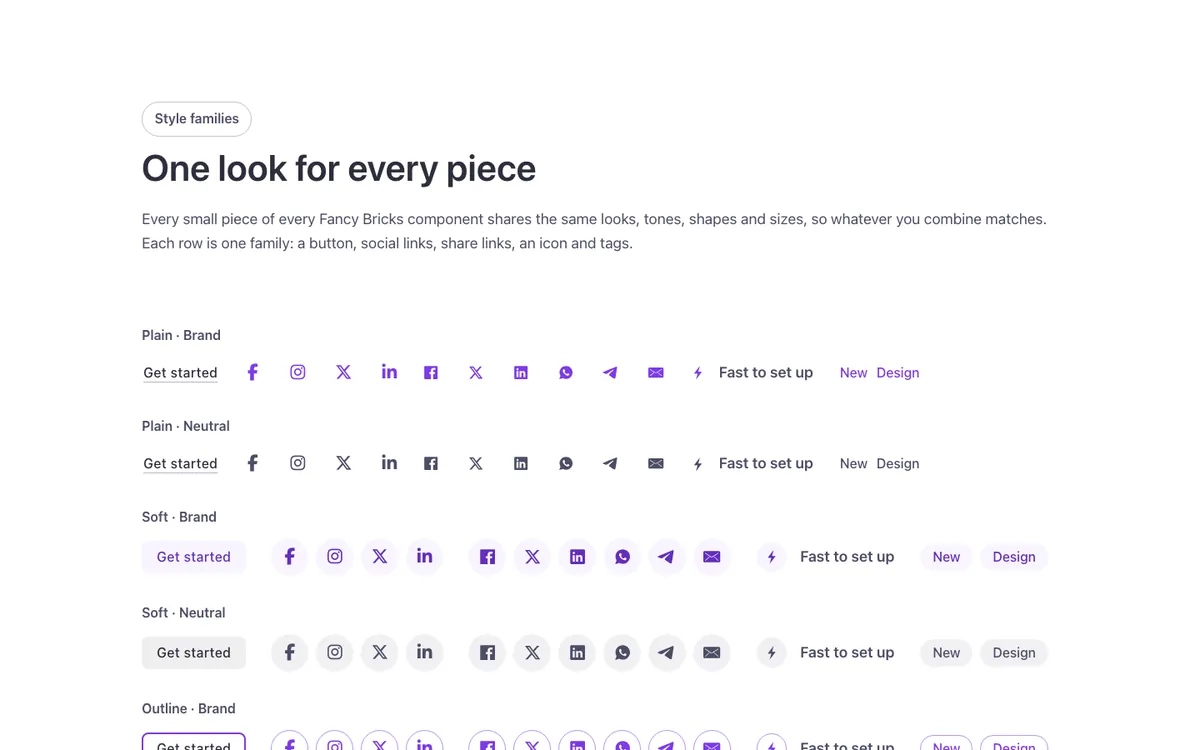
See it live: Elements · Style families on fancybricks.co — the live preview, and the button that copies it.
Or open the preview on its own — narrow the window to see it on a phone — and in dark mode.
Structure
This is what the Bricks Structure panel shows after you paste the template. Component instances say which component they are.
Style families
Families · Light
Container
Intro (FBK Intro)
Families
Family · Plain · Brand
Label
Pieces
Button (FBK Button)
Social wrap
Social (FBK Social)
Share (FBK Share)
Icon item wrap
Icon item (FBK Icon item)
Chips
Chip · New
Chip · Design
Family · Plain · Neutral
Label
Pieces
Button (FBK Button)
Social wrap
Social (FBK Social)
Share (FBK Share)
Icon item wrap
Icon item (FBK Icon item)
Chips
Chip · New
Chip · Design
Family · Soft · Brand
Label
Pieces
Button (FBK Button)
Social wrap
Social (FBK Social)
Share (FBK Share)
Icon item wrap
Icon item (FBK Icon item)
Chips
Chip · New
Chip · Design
Family · Soft · Neutral
Label
Pieces
Button (FBK Button)
Social wrap
Social (FBK Social)
Share (FBK Share)
Icon item wrap
Icon item (FBK Icon item)
Chips
Chip · New
Chip · Design
Family · Outline · Brand
Label
Pieces
Button (FBK Button)
Social wrap
Social (FBK Social)
Share (FBK Share)
Icon item wrap
Icon item (FBK Icon item)
Chips
Chip · New
Chip · Design
Family · Outline · Neutral
Label
Pieces
Button (FBK Button)
Social wrap
Social (FBK Social)
Share (FBK Share)
Icon item wrap
Icon item (FBK Icon item)
Chips
Chip · New
Chip · Design
Family · Solid · Brand
Label
Pieces
Button (FBK Button)
Social wrap
Social (FBK Social)
Share (FBK Share)
Icon item wrap
Icon item (FBK Icon item)
Chips
Chip · New
Chip · Design
Family · Solid · Neutral
Label
Pieces
Button (FBK Button)
Social wrap
Social (FBK Social)
Share (FBK Share)
Icon item wrap
Icon item (FBK Icon item)
Chips
Chip · New
Chip · Design
Family · Elevated · Brand
Label
Pieces
Social wrap
Social (FBK Social)
Share (FBK Share)
Icon item wrap
Icon item (FBK Icon item)
Chips
Chip · New
Chip · Design
Family · Elevated · Neutral
Label
Pieces
Social wrap
Social (FBK Social)
Share (FBK Share)
Icon item wrap
Icon item (FBK Icon item)
Chips
Chip · New
Chip · Design
Families · Effects
Container
Intro (FBK Intro)
Effects
Effect · None
Label
Pieces
Social wrap
Social (FBK Social)
Share (FBK Share)
Effect · Grow
Label
Pieces
Social wrap
Social (FBK Social)
Share (FBK Share)
Effect · Pop
Label
Pieces
Social wrap
Social (FBK Social)
Share (FBK Share)
Effect · Lift
Label
Pieces
Social wrap
Social (FBK Social)
Share (FBK Share)
Effect · Spin
Label
Pieces
Social wrap
Social (FBK Social)
Share (FBK Share)
Families · Shapes
Container
Intro (FBK Intro)
Shapes
Shape · Round
Label
Pieces
Social wrap
Social (FBK Social)
Share (FBK Share)
Icon item wrap
Icon item (FBK Icon item)
Chips
Chip · New
Chip · Design
Shape · Rounded
Label
Pieces
Social wrap
Social (FBK Social)
Share (FBK Share)
Icon item wrap
Icon item (FBK Icon item)
Chips
Chip · New
Chip · Design
Shape · Square
Label
Pieces
Social wrap
Social (FBK Social)
Share (FBK Share)
Icon item wrap
Icon item (FBK Icon item)
Chips
Chip · New
Chip · Design
Shape · Blob
Label
Pieces
Social wrap
Social (FBK Social)
Share (FBK Share)
Icon item wrap
Icon item (FBK Icon item)
Families · Dark
Container
Intro (FBK Intro)
Families
Family · Plain · Brand
Label
Pieces
Button (FBK Button)
Social wrap
Social (FBK Social)
Share (FBK Share)
Icon item wrap
Icon item (FBK Icon item)
Chips
Chip · New
Chip · Design
Family · Plain · Neutral
Label
Pieces
Button (FBK Button)
Social wrap
Social (FBK Social)
Share (FBK Share)
Icon item wrap
Icon item (FBK Icon item)
Chips
Chip · New
Chip · Design
Family · Soft · Brand
Label
Pieces
Button (FBK Button)
Social wrap
Social (FBK Social)
Share (FBK Share)
Icon item wrap
Icon item (FBK Icon item)
Chips
Chip · New
Chip · Design
Family · Soft · Neutral
Label
Pieces
Button (FBK Button)
Social wrap
Social (FBK Social)
Share (FBK Share)
Icon item wrap
Icon item (FBK Icon item)
Chips
Chip · New
Chip · Design
Family · Outline · Brand
Label
Pieces
Button (FBK Button)
Social wrap
Social (FBK Social)
Share (FBK Share)
Icon item wrap
Icon item (FBK Icon item)
Chips
Chip · New
Chip · Design
Family · Outline · Neutral
Label
Pieces
Button (FBK Button)
Social wrap
Social (FBK Social)
Share (FBK Share)
Icon item wrap
Icon item (FBK Icon item)
Chips
Chip · New
Chip · Design
Family · Solid · Brand
Label
Pieces
Button (FBK Button)
Social wrap
Social (FBK Social)
Share (FBK Share)
Icon item wrap
Icon item (FBK Icon item)
Chips
Chip · New
Chip · Design
Family · Solid · Neutral
Label
Pieces
Button (FBK Button)
Social wrap
Social (FBK Social)
Share (FBK Share)
Icon item wrap
Icon item (FBK Icon item)
Chips
Chip · New
Chip · Design
Family · Elevated · Brand
Label
Pieces
Social wrap
Social (FBK Social)
Share (FBK Share)
Icon item wrap
Icon item (FBK Icon item)
Chips
Chip · New
Chip · Design
Family · Elevated · Neutral
Label
Pieces
Social wrap
Social (FBK Social)
Share (FBK Share)
Icon item wrap
Icon item (FBK Icon item)
Chips
Chip · New
Chip · Design
Families · Brand
Container
Intro (FBK Intro)
Families
Family · Plain · Brand
Label
Pieces
Button (FBK Button)
Social wrap
Social (FBK Social)
Share (FBK Share)
Icon item wrap
Icon item (FBK Icon item)
Chips
Chip · New
Chip · Design
Family · Plain · Neutral
Label
Pieces
Button (FBK Button)
Social wrap
Social (FBK Social)
Share (FBK Share)
Icon item wrap
Icon item (FBK Icon item)
Chips
Chip · New
Chip · Design
Family · Soft · Brand
Label
Pieces
Button (FBK Button)
Social wrap
Social (FBK Social)
Share (FBK Share)
Icon item wrap
Icon item (FBK Icon item)
Chips
Chip · New
Chip · Design
Family · Soft · Neutral
Label
Pieces
Button (FBK Button)
Social wrap
Social (FBK Social)
Share (FBK Share)
Icon item wrap
Icon item (FBK Icon item)
Chips
Chip · New
Chip · Design
Family · Outline · Brand
Label
Pieces
Button (FBK Button)
Social wrap
Social (FBK Social)
Share (FBK Share)
Icon item wrap
Icon item (FBK Icon item)
Chips
Chip · New
Chip · Design
Family · Outline · Neutral
Label
Pieces
Button (FBK Button)
Social wrap
Social (FBK Social)
Share (FBK Share)
Icon item wrap
Icon item (FBK Icon item)
Chips
Chip · New
Chip · Design
Family · Solid · Brand
Label
Pieces
Button (FBK Button)
Social wrap
Social (FBK Social)
Share (FBK Share)
Icon item wrap
Icon item (FBK Icon item)
Chips
Chip · New
Chip · Design
Family · Solid · Neutral
Label
Pieces
Button (FBK Button)
Social wrap
Social (FBK Social)
Share (FBK Share)
Icon item wrap
Icon item (FBK Icon item)
Chips
Chip · New
Chip · Design
Family · Elevated · Brand
Label
Pieces
Social wrap
Social (FBK Social)
Share (FBK Share)
Icon item wrap
Icon item (FBK Icon item)
Chips
Chip · New
Chip · Design
Family · Elevated · Neutral
Label
Pieces
Social wrap
Social (FBK Social)
Share (FBK Share)
Icon item wrap
Icon item (FBK Icon item)
Chips
Chip · New
Chip · Design
Surfaces · Soft
Container
Intro (FBK Intro)
Surfaces
Card · Plain · Brand (FBK Card)
Card · Plain · Neutral (FBK Card)
Card · Soft · Brand (FBK Card)
Card · Soft · Neutral (FBK Card)
Card · Outline · Brand (FBK Card)
Card · Outline · Neutral (FBK Card)
Card · Solid · Brand (FBK Card)
Card · Solid · Neutral (FBK Card)
Card · Elevated · Brand (FBK Card)
Card · Elevated · Neutral (FBK Card)
Surfaces · Dark
Container
Intro (FBK Intro)
Surfaces
Card · Plain · Brand (FBK Card)
Card · Plain · Neutral (FBK Card)
Card · Soft · Brand (FBK Card)
Card · Soft · Neutral (FBK Card)
Card · Outline · Brand (FBK Card)
Card · Outline · Neutral (FBK Card)
Card · Solid · Brand (FBK Card)
Card · Solid · Neutral (FBK Card)
Card · Elevated · Brand (FBK Card)
Card · Elevated · Neutral (FBK Card)
Surfaces · Brand
Container
Intro (FBK Intro)
Surfaces
Card · Plain · Brand (FBK Card)
Card · Plain · Neutral (FBK Card)
Card · Soft · Brand (FBK Card)
Card · Soft · Neutral (FBK Card)
Card · Outline · Brand (FBK Card)
Card · Outline · Neutral (FBK Card)
Card · Solid · Brand (FBK Card)
Card · Solid · Neutral (FBK Card)
Card · Elevated · Brand (FBK Card)
Card · Elevated · Neutral (FBK Card)
Controls · Soft
Container
Intro (FBK Intro)
Controls
Controls · brand
Label
Controls
Control · plain · brand
Icon
Control · soft · brand
Icon
Control · outline · brand
Icon
Control · solid · brand
Icon
Control · elevated · brand
Icon
Controls · neutral
Label
Controls
Control · plain · neutral
Icon
Control · soft · neutral
Icon
Control · outline · neutral
Icon
Control · solid · neutral
Icon
Control · elevated · neutral
Icon
Controls · shapes
Label
Controls
Control · elevated · brand
Icon
Pause · round
Toggle · Pause icon
Toggle · Play icon
Control · elevated · brand
Icon
Pause · rounded
Toggle · Pause icon
Toggle · Play icon
Control · elevated · brand
Icon
Pause · square
Toggle · Pause icon
Toggle · Play icon
Control · elevated · brand
Icon
Pause · blob
Toggle · Pause icon
Toggle · Play icon
Accordion (FBK Accordion)
Item · Each look on the icon of an accordion (FBK Accordion item)
Controls · Dark
Container
Intro (FBK Intro)
Controls
Controls · brand
Label
Controls
Control · plain · brand
Icon
Control · soft · brand
Icon
Control · outline · brand
Icon
Control · solid · brand
Icon
Control · elevated · brand
Icon
Controls · neutral
Label
Controls
Control · plain · neutral
Icon
Control · soft · neutral
Icon
Control · outline · neutral
Icon
Control · solid · neutral
Icon
Control · elevated · neutral
Icon
Controls · shapes
Label
Controls
Control · elevated · brand
Icon
Pause · round
Toggle · Pause icon
Toggle · Play icon
Control · elevated · brand
Icon
Pause · rounded
Toggle · Pause icon
Toggle · Play icon
Control · elevated · brand
Icon
Pause · square
Toggle · Pause icon
Toggle · Play icon
Control · elevated · brand
Icon
Pause · blob
Toggle · Pause icon
Toggle · Play icon
Accordion (FBK Accordion)
Item · Each look on the icon of an accordion (FBK Accordion item)
Controls · Brand
Container
Intro (FBK Intro)
Controls
Controls · brand
Label
Controls
Control · plain · brand
Icon
Control · soft · brand
Icon
Control · outline · brand
Icon
Control · solid · brand
Icon
Control · elevated · brand
Icon
Controls · neutral
Label
Controls
Control · plain · neutral
Icon
Control · soft · neutral
Icon
Control · outline · neutral
Icon
Control · solid · neutral
Icon
Control · elevated · neutral
Icon
Controls · shapes
Label
Controls
Control · elevated · brand
Icon
Pause · round
Toggle · Pause icon
Toggle · Play icon
Control · elevated · brand
Icon
Pause · rounded
Toggle · Pause icon
Toggle · Play icon
Control · elevated · brand
Icon
Pause · square
Toggle · Pause icon
Toggle · Play icon
Control · elevated · brand
Icon
Pause · blob
Toggle · Pause icon
Toggle · Play icon
Accordion (FBK Accordion)
Item · Each look on the icon of an accordion (FBK Accordion item)
The template also pastes a dashed note above the section, with the short version of this page. It only shows inside the builder, never on the published page — see Builder notes.
How to adjust
Every step is the same move: pick the element in the Structure panel, change its Properties.
How to adjust a template shows every one of them in a screenshot of the real builder: the Structure and Properties panels, the classes on an element, a component's style families and the field where a CSS variable goes.
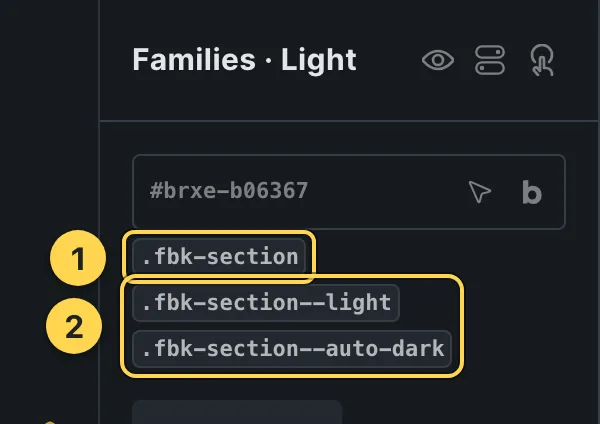
The classes this element carries, in the Bricks panel.
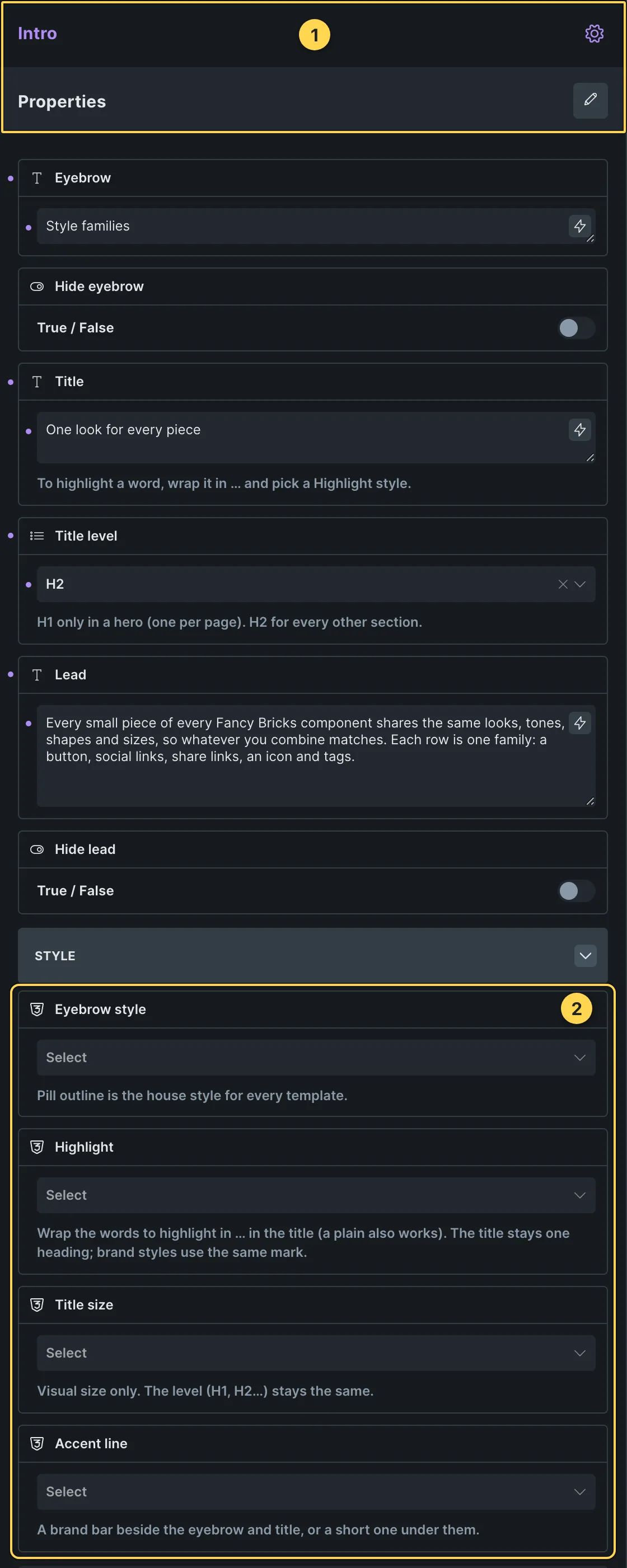
This template's own component, with its Style group open.
- Paste the template in Bricks first — see Copy and paste.
- Select Intro ×11 (FBK Intro) › Properties: Eyebrow, Hide eyebrow, Title, Title level, Lead, Hide lead · Style group: Eyebrow style, Highlight, Title size, Accent line · Layout group: Alignment, Layout, Background, Spacing · Motion group: Reveal in slider.
- Select Button ×24 (FBK Button) › Properties: Text, Link, Tone, Shadow on hover · Icon group: Icon, Icon position · Style group: Style, Size, Width, Hover effect.
- Select Social ×39 (FBK Social) › Properties: Networks group: Facebook link, Instagram link, X link, LinkedIn link, YouTube link, TikTok link, Hide Facebook, Hide Instagram, Hide X, Hide LinkedIn, Hide YouTube, Hide TikTok · Style group: Look, Tone, Shape, Size, Show names, Hover effect, Background.
- Select Share ×39 (FBK Share) › Properties: Label, Hide label · Networks group: Facebook, X, LinkedIn, WhatsApp, Telegram, Pinterest, Bluesky, Email, Open in a new tab · Style group: Look, Tone, Shape, Size, Hover effect, Network colors, Show network names, Layout, Background.
- Select Icon item ×34 (FBK Icon item) › Properties: Icon, Title, Title tag, Text · Show or hide group: Hide icon, Hide text · Style group: Layout, Look, Tone, Shape, Size, Alignment, HTML tag, Background.
- Select Card · Plain · Brand ×3, Card · Plain · Neutral ×3, Card · Soft · Brand ×3 (+7 more) (FBK Card) › Properties: Title, Title level, Text, Hide text · Style group: Highlight, Title size, Look, Tone, Shape, Photo overlay, Padding, Photo hover, Background · Layout group: HTML tag, Layout.
- Select Accordion ×3 (FBK Accordion) › Properties: Open the first item, Several open at once, FAQ schema · Style group: Style, Open item accent, Open title color, Hover effect, Title color on hover, Background · Icon group: Icon, Look, Tone, Shape, Size, Hover effect, Icon position · Layout group: Numbers, Columns · Autoplay group: Time per item, Autoplay on phones.
- Select Item · Each look on the icon of an accordion ×3 (FBK Accordion item) › Properties: Title, Text, Hide text, Tag, Tag text · More group: Title level, Icon.
Finish by hand
- Every component with small pieces has the same Look, Tone, Shape and Size options: pick the same values everywhere and the pieces match.
- A tag or badge of your own: a text element with the classes
fbk-ui,fbk-ui__boxandfbk-chip, plusfbk-ui--soft(or --outline, --solid, --elevated),fbk-ui--neutralfor the neutral tone andfbk-ui--roundor --square for the shape. - The colors come from your brand color and the heading color; one hover duration for all
of them: set
--fbk-hover(for example 0.3s) on the body to change it everywhere.
On phones
The template is designed desktop first, the Bricks default, and only changes at the two widths the library uses:
- 991px and below —
.fbk-accordion,.fbk-intro. - 767px and below —
.fbk-section,.fbk-share.
Those changes live in Bricks' own breakpoint fields, so you edit them where you always do: pick the breakpoint in the toolbar and the same fields follow.
Careful with the classes shared by the whole library (fbk-section, fbk-intro, the
component classes): a change there shows up in every template that uses them.
If your site's breakpoints are set up mobile first, copy the mobile-first variant of the template instead — see Copy and paste.
Accessibility
In this template, keyboard focus is visible on every interactive piece; movement is cut back
when the visitor's system asks for less motion; the state screen readers need is already set
(aria-hidden, aria-label).
What is checked on every template, and what depends on your own palette: Accessibility.
Dark mode
With your site in dark mode this section turns dark too — the class fbk-section--auto-dark
on the section does it. Remove the class to keep it light.
Its background is a modifier on the section, so you can swap it for any of the ones the
template is checked with: fbk-section--light, fbk-section--soft, fbk-section--dark,
fbk-section--brand.
How the library follows your site's color scheme: Dark mode and preview.